
The best cinema wiring is the wiring you never have to think about. The lights dim, the projector fires up, and the room disappears into the film - without trailing leads, failed HDMI handshakes or a rack that becomes impossible to service. Knowing how to plan cinema wiring before plasterboard, joinery and acoustic treatments go in is what makes that possible.
A home cinema is not simply a television with more speakers. It is a connected system of loudspeakers, subwoofers, display hardware, AV processing, network equipment, control, lighting and power. Plan the routes early and the finished room can look beautifully calm while delivering the full impact of a convincing soundtrack.
Start with the room, not the cable catalogue
Wiring decisions should follow the room design and system ambition. First establish where people will sit, where the screen will be, whether the display is a projector or large-format television, and where the equipment will live. A dedicated cinema often puts the AV processor, power amplifiers, sources and network hardware in a rack at the rear or in an adjoining cupboard. In a living room installation, that equipment may need to sit in discreet furniture or a remote utility space.
Your seating position determines speaker placement, and speaker placement determines cable routes. A 5.1 system needs front left, centre and right speakers, two surrounds and a subwoofer. A more enveloping 7.1.4 Dolby Atmos layout adds rear surrounds and four height channels. The difference is substantial: effects can travel above and around the audience rather than merely from wall to wall.
Do not run cables according to where a speaker might look attractive. Work from the listening positions and the intended format. In a properly planned room, the front three speakers sit behind an acoustically transparent projection screen or are positioned precisely around the display, while surround and height speakers are placed to create a coherent soundfield. This is where a scaled room drawing is worth far more than a rough sketch on site.
How to plan cinema wiring around your system
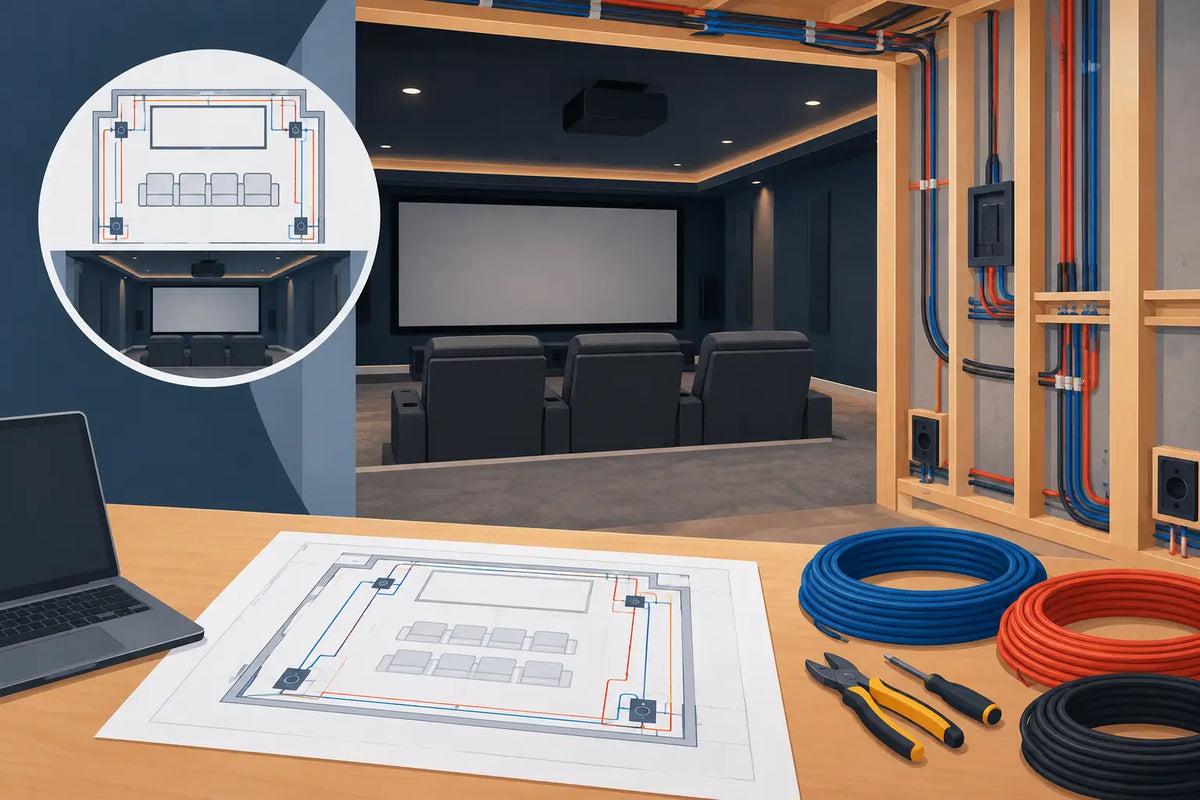
Once the layout is clear, create a cable schedule. It need not be complicated, but it should show every endpoint, route, cable type and termination location. Label each run at both ends while the walls are open. A label such as “Rear Left Surround - Rack End” may feel excessive on installation day; it will feel wonderfully sensible when a future upgrade is being commissioned years later.
For passive loudspeakers, run individual speaker cables from the rack to every speaker position. Avoid daisy-chaining channels unless the system has been specifically designed for it. Use quality, suitably specified cable with enough conductor area for the run length and loudspeaker load. Long runs to rear or height channels may benefit from a heavier gauge than short front-channel runs, but cable selection should be proportionate rather than extravagant.
Subwoofers deserve special consideration. Many use line-level connections from the AV processor, so run screened subwoofer cable or appropriate balanced cabling where the equipment supports it. A second subwoofer can transform bass consistency across several seats, particularly in a larger room. Even if you begin with one, providing a route and power provision for a second gives you useful options during calibration.
For a projector, allow for more than one connection. The critical video link is usually a certified active optical HDMI cable, especially for longer routes and 4K high-frame-rate content. An empty conduit alongside it is wise insurance. Video standards move quickly, and replacing a fixed cable above a finished ceiling is the sort of job nobody wants.
A network cable at the projector position can also be worthwhile. It supports firmware updates, IP control and certain integrated control systems. If the projector uses a motorised lens or screen arrangement, confirm every control and trigger requirement before cables are pulled.
Separate power from signal routes
Mains power and low-voltage signal cables should not share the same route. This is both good installation practice and an important way to reduce the chance of noise finding its way into sensitive audio and video connections. Keep speaker cable, network cable, HDMI and control wiring in separate containment from mains where possible, crossing at right angles if routes must meet.
A qualified electrician should design and install mains circuits in accordance with current UK regulations. For a serious cinema, discuss a dedicated circuit for the AV rack and one for the projector or display. Whether separate circuits are worthwhile depends on the equipment, existing consumer unit capacity and the wider electrical design, but it is much easier to consider now than after the room is decorated.
Plan socket locations with the actual equipment in mind. A rack can require more outlets than expected: AV processor, power amplifiers, source components, network switch, control processor, cooling equipment and power conditioning all need space. Leave sensible capacity rather than relying on a stack of extension blocks. At speaker positions, powered subwoofers need mains sockets, and active speakers or future active subwoofer positions may do too.
Use conduit wherever access may matter
Conduit is one of the least glamorous and most valuable parts of a cinema installation. It creates a serviceable pathway for HDMI, network, control and future cabling without disturbing finished walls. Use generously sized conduit with gentle bends and accessible draw points. A route that technically accepts a cable but cannot accommodate its connector, bend radius or a draw wire is not a useful route.
This matters particularly with fabric acoustic walls and ceiling treatments. These can conceal speakers and cabling beautifully, but access is still needed at junctions, projector locations and equipment-rack entries. Photograph cable routes before walls are closed and retain the drawings with the system documentation. It is a small discipline that saves considerable guesswork later.
Think beyond speakers and picture
The cinema experience is shaped by the details around the main system. Wired network points are preferable to relying entirely on Wi-Fi for streaming sources and control hardware. Cat6 or Cat6A cabling gives useful headroom for networked equipment, video distribution and future changes, although the final specification should reflect the scale of the property and intended system.
Consider control wiring for a screen, curtains, lighting, ventilation and door contact sensors if the room will be automated. A simple wall keypad may be all one family wants; another may prefer a single remote or touch panel that starts the projector, lowers the screen, selects the source and sets scene lighting. Neither approach is inherently better. The right one is the one everyone can use without a manual.
Ventilation should be planned with equal care. Power amplifiers and projectors produce heat, and an enclosed rack needs a clear airflow strategy. If fans are required, choose quiet equipment and place it so that fan noise does not intrude on quiet dialogue. It is disappointing to spend on refined loudspeakers and then hear a noisy cupboard at the most dramatic moment of a film.
Leave headroom for the system you may want later
A cinema does not have to begin at reference level to be planned intelligently. You might start with a high-quality 5.1.2 system and add rear surrounds or more height channels later. Pulling cable for those positions during building work costs relatively little compared with reopening a ceiling afterwards.
The same principle applies to equipment rack space. Leave room for a separate power amplifier, upgraded AV processor, dedicated music streamer or additional source component. Allow access behind the rack for terminations and enough slack to move components forward for servicing. A tidy rack is not just satisfying to look at; it makes fault-finding, calibration and future improvements much easier.
Do not assume more channels always mean better cinema. A carefully installed 5.1.4 system with correct placement, capable loudspeakers and proper audio calibration will often be more convincing than a larger channel count forced into unsuitable positions. Room acoustics matter too. Bass control, first-reflection treatment and thoughtfully designed acoustic walls can reveal clarity, scale and dialogue detail that expensive electronics alone cannot create.
Bring the plan together before first fix
Before the electrician and installer begin, walk through the design in the room itself. Stand at the main seat, check sightlines to the screen, confirm the rack location, identify every speaker and inspect the proposed ceiling routes. Ask how the projector cable will be replaced, where subwoofers can be positioned and how the system will be cooled and serviced. If a route cannot be explained clearly before first fix, it is unlikely to become easier once the room is finished.
For a significant project, professional design and commissioning are worthwhile. At Yorkshire AV, we see the difference that careful cable planning makes when the final stage is audio calibration rather than problem-solving. The reward is a cinema that feels effortless: detailed dialogue, controlled bass, an image that holds your attention and no visible compromise in the room itself.
Plan generously, label meticulously and protect future routes. Then, when the lights go down, the only thing demanding attention will be the film.

Share:
How to Reduce Turntable Hum Without Losing Detail